

Run Claude Code and Codex at the same time and a question shows up fast: who is working right now, and who is waiting for my answer?
One agent fits in one terminal window. With two or three, you have to open each window to know where things stand. Close the laptop and running work can stop. And to pass results from one agent to another, a person ends up copying and pasting.
Herdr is a terminal workspace built for exactly this. On a Mac, with Herdr 0.9.5, we ran Claude Code and Codex together and built, from start to finish, a dashboard that shows the real public issues of the Herdr repository.
In this post:
- What Herdr is and why people use it
- Four status dots: who is waiting on you, at a glance
- What survives a restart, and what doesn't
- Agents driving Herdr: the Skill and three commands
- Building in parallel with worktrees
- Getting a review from a different model
- Four common patterns and how to pick one
- Limits and cautions
How to read the numbers. [Official] means material published by the Herdr team. [Measured] means results from our own hands-on run. We used macOS (Apple Silicon), Herdr 0.9.5, Claude Code and Codex. The screenshots come from our Korean-language video.
1. What is Herdr?
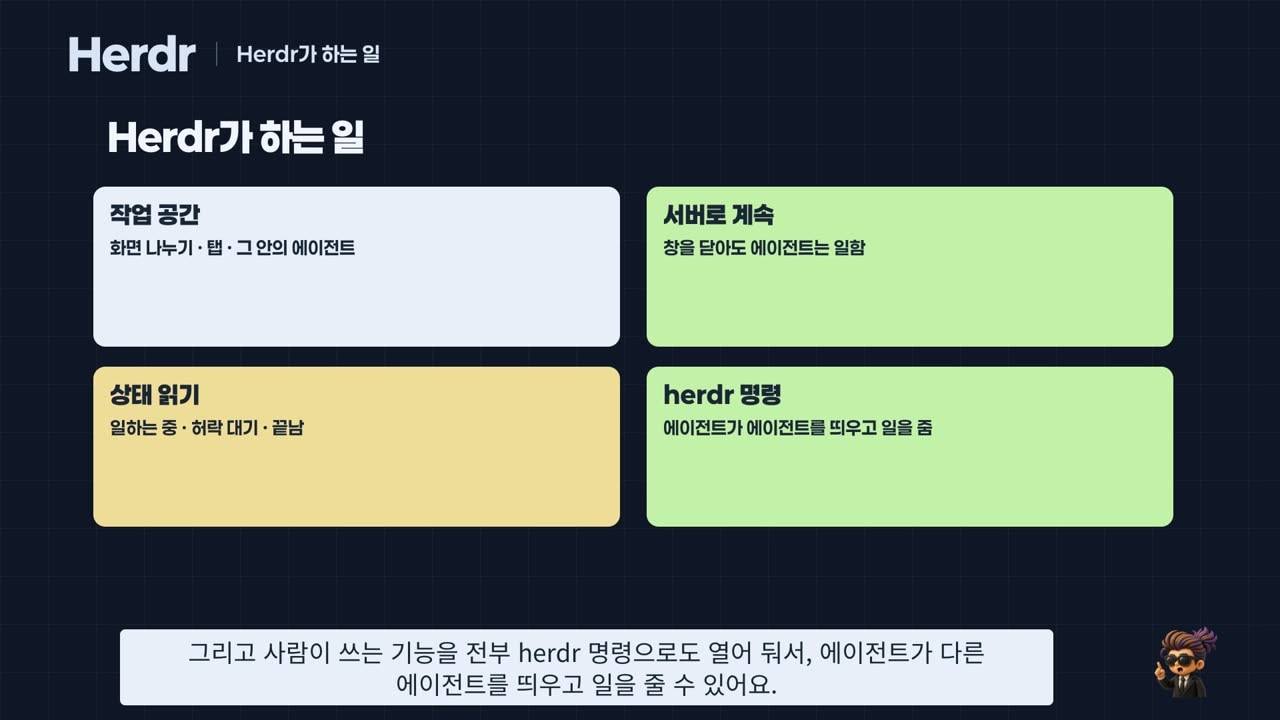
Herdr is a terminal workspace where your agents live. You split the screen, open tabs, and run Claude Code or Codex inside. It does four things.
- Workspace: workspaces (usually one project folder each) → tabs → panes (one terminal each).
- Keeps running as a server: a server runs in the background, separate from the screen, so agents keep working when you close the window.
- Reads status: it reads whether each agent is working, waiting for permission, or done, and shows it as a colored dot.
- herdr commands: everything a person can do is also exposed as a command, so one agent can start another agent and hand it work.
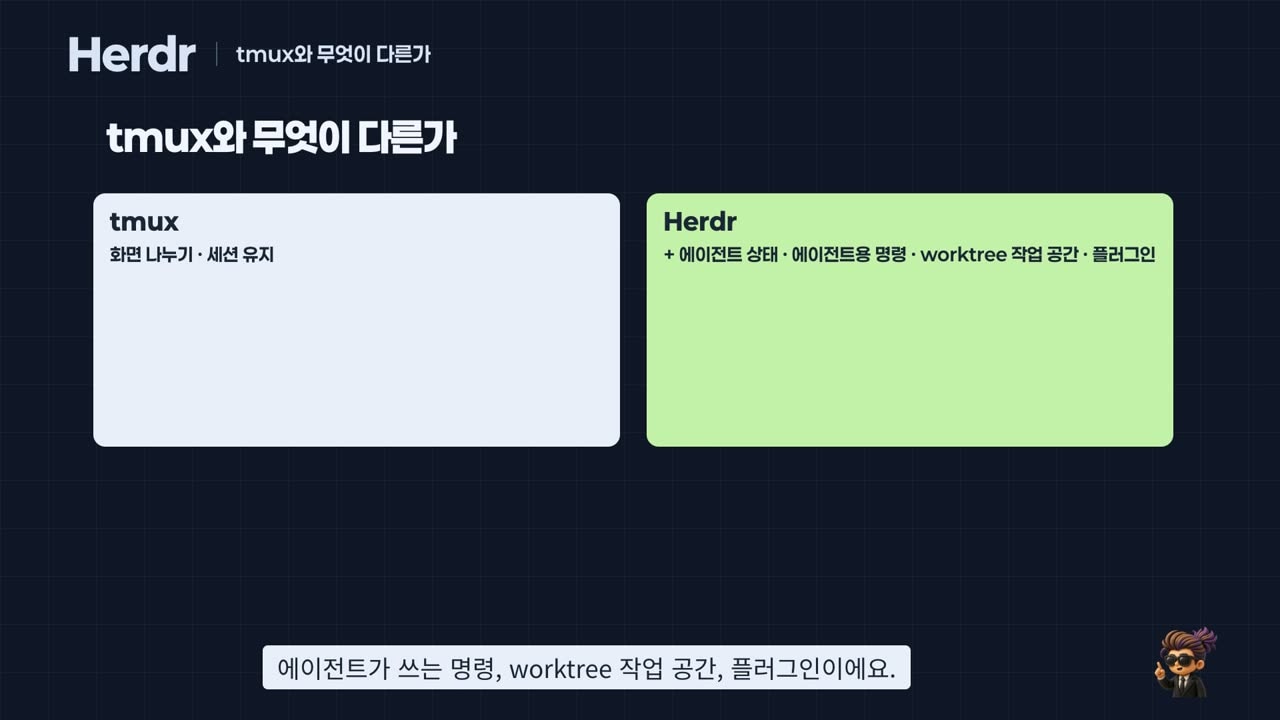
Split panes and persistent sessions are also what the long-standing tmux does. Herdr adds the agent parts on top: status reading, commands for agents, worktree workspaces, and plugins. Its shortcuts also start with Ctrl+B, like tmux.
The herdr.dev home page shows how widely it is used. As of October 24, 2026: 44,627 GitHub stars, 1,644,092 installs, 1,789 community plugins, and 22 agent CLIs detected [Official]. It runs on macOS, Linux and Windows under the Apache 2.0 license.
Installing takes one Homebrew line.
brew install herdr
herdr --version
herdr
2. Four status dots
When Claude Code or Codex starts in a pane, Herdr notices and keeps reading the live bottom of that pane [Official] (Agents). The result appears as a dot in the agent list at the bottom left.
| Dot | State | Meaning |
|---|---|---|
| Empty circle | idle | Waiting for input |
| Yellow | working | Producing an answer |
| Red | blocked | Stopped on a permission prompt or question |
| Teal | done | Finished, and you haven't looked yet |
When we asked Claude Code to create a file, the dot went yellow for a moment and then red. It had stopped to ask whether it could create the file. Even while another pane was zoomed to full screen, the list showed right away who had stopped [Measured].
If colors are hard to tell apart, the settings screen (Ctrl+B → S) can switch the states to distinct symbols.
One caution. Herdr judges state from what the screen looks like, so a prompt it has never seen can show as idle instead of blocked. In our run, Codex's "do you trust this folder?" prompt showed as idle [Measured]. Don't send input just because a pane says idle. Look at the pane first.
3. What survives a restart
There are two ways to stop Herdr, and they leave different things behind [Official] (Session state).
| How you stop it | Running commands | Pane layout | Agent conversation |
|---|---|---|---|
Ctrl+B → Q (close the screen only) | Keep running | Unchanged | Unchanged |
herdr server stop (stop the server; a reboot is the same) | End | Comes back | Resumes only for agents with the integration installed |
We checked it ourselves [Measured].
- With
ping localhostrunning in the left pane, we closed the screen and came back. The ping counter had kept climbing the whole time. - After stopping the server and starting it again, both panes came back, but the ping was gone.
- In the right pane, Herdr typed
claude --resumefor us and reopened the earlier conversation. Asked "how far did you just count?", Claude Code answered that it had counted to 3.
If you want to see a pane's earlier output after a restart, you can turn on pane_history. It is off by default: the docs explain that pane output can include secrets, tokens and prompts. Once on, that output is saved as a file in the config folder, so turn it on only when you need it.
4. Agents driving Herdr
Herdr controls three kinds of things: layout (workspaces, tabs, panes), the terminal in a pane, and the agent in a pane. All three are available as herdr commands, and agents use those commands.
The manual that tells an agent how is the Skill. It ships inside Herdr; you just write it out to a file.
mkdir -p .claude/skills/herdr
herdr --skill > .claude/skills/herdr/SKILL.md
Inside a Herdr pane, HERDR_ENV is 1; outside it is empty. The Skill says to drive Herdr only when that value is 1, so the agent won't poke at the wrong screen.
We asked Claude Code in plain words: "Use Herdr to open a pane on the right, start Codex there, and have it summarize this project in three lines." It split the pane, started Codex, sent the task, waited, and read the answer, in that order [Measured]. By default it asks permission for every command. We don't recommend the mode that approves everything automatically, because you lose sight of what the agent types into other panes.
By hand, three commands are enough.
herdr agent get summarizer              # check status (agent_status field)
herdr agent prompt summarizer "..." --wait   # send work and wait until done
herdr agent read summarizer --lines 12  # read the answer
Use agent start for a new agent and pane split to split a pane. These three are the building blocks of the automation script later on.
5. Building in parallel with worktrees
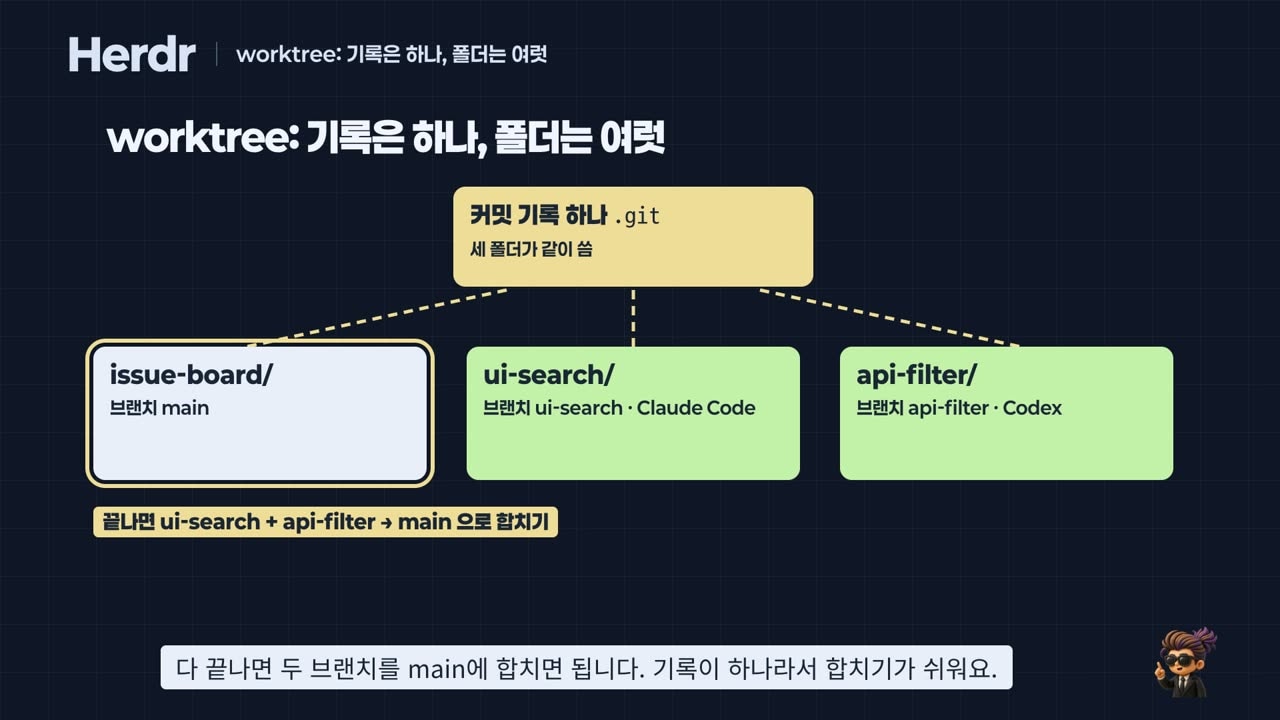
If Claude Code and Codex edit the same file in one folder at the same time, one side's changes get overwritten or tangled. Copying the whole folder means the copies know nothing about each other, which makes merging painful.
git worktree sits in between. The commit history is shared, and only the folder holding the files is separate (git-worktree docs). Each folder gets its own branch. In Herdr, one Ctrl+B → Shift+G, or the single command below, creates the worktree along with a workspace opened in that folder.
herdr worktree create --branch api-filter --no-focusHere is how we split the work.
- One contract document,
contract/API.md, describes the data shape the server returns. Both the UI side and the API side read it. - Claude Code in the ui-search workspace edits only the UI (
src/). Codex in the api-filter workspace edits only the API (server/,tests/). - While both worked, the person only watched the dots in the sidebar and went over to approve whenever one turned red.
The results [Measured]:
- Merging both branches into main with
git mergehad no conflicts, because they touched different folders. - All 13
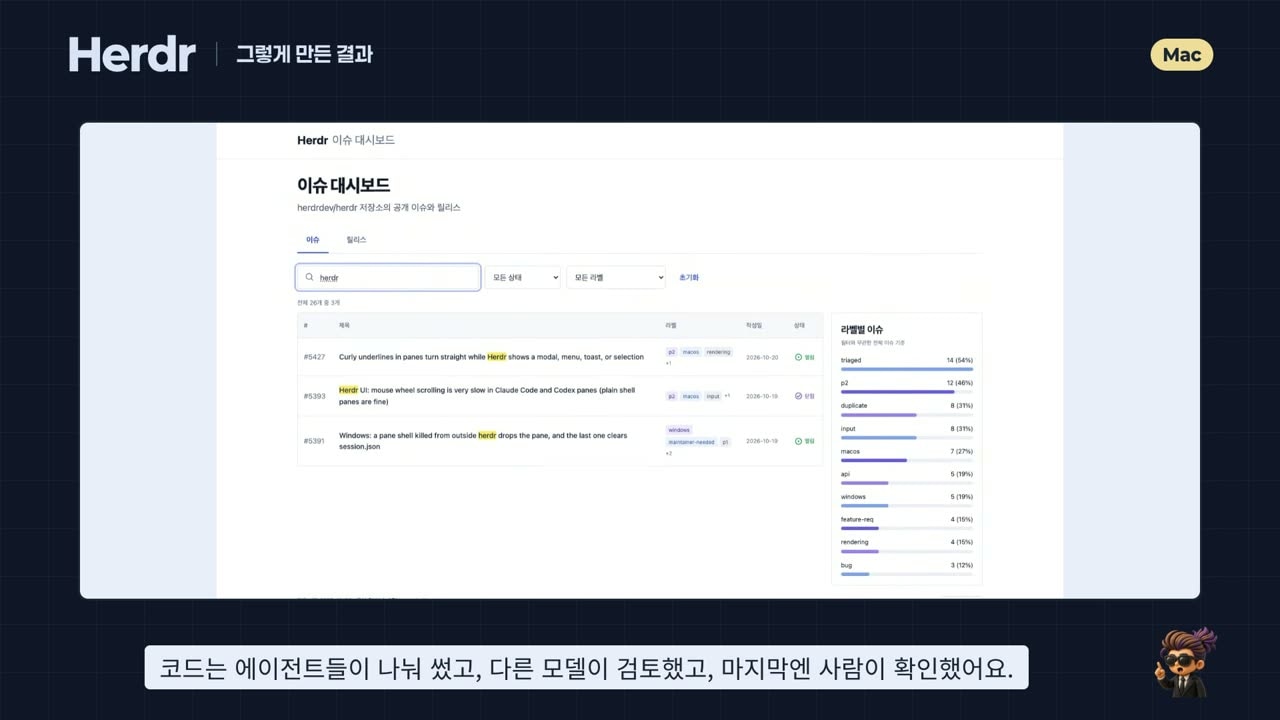
npm testtests passed.npm run accept, which checks the contract, had 5 failures in the starter; after the merge, all 5 passed. - The browser showed 26 real public issues from the Herdr repository. The Codex-built server does the filtering; the Claude Code-built UI does the display.
You don't always need a worktree. For questions or reading code, one folder is fine. Split when two or more agents edit files at the same time.
6. Getting a review from a different model
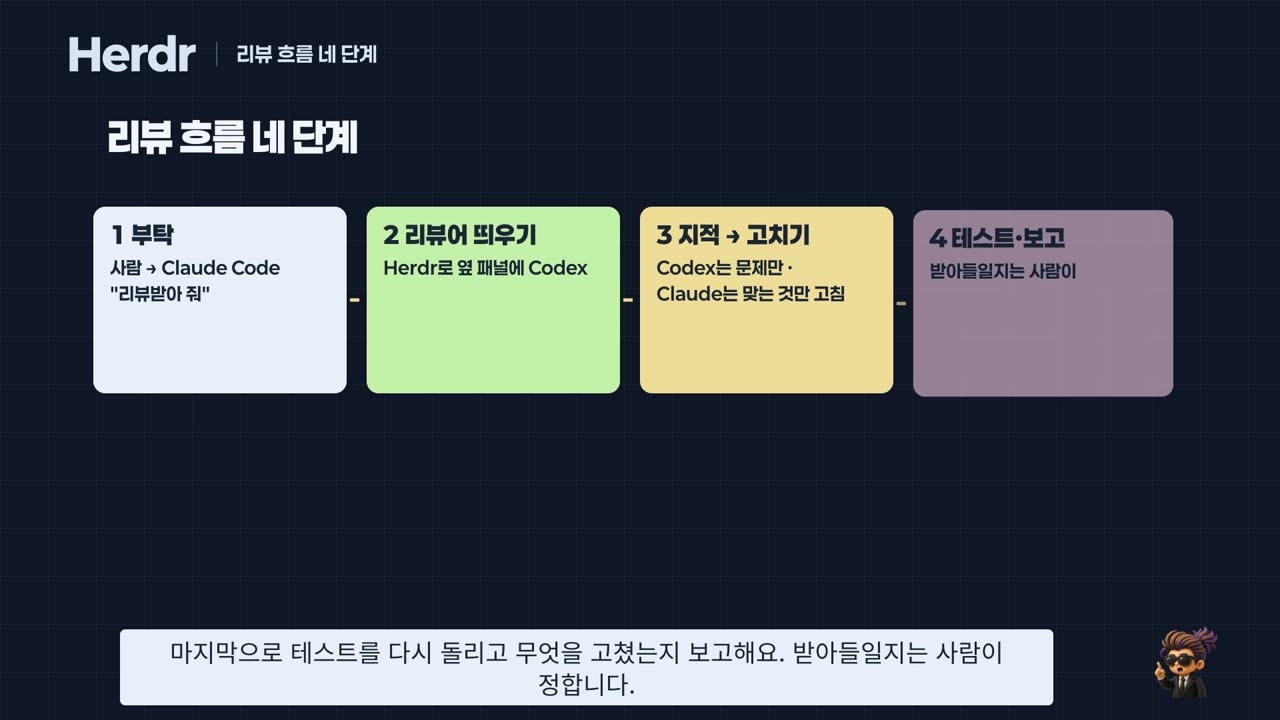
Passing every test doesn't mean there are no problems. When the same model writes and reviews, it tends to trust its own first assumptions. For the same reason human teams ask a colleague for review, we showed the code to a model from a different company.
We asked Claude Code: "Use Herdr to start Codex on the right and have it review the changed code. Codex should only find problems, not fix them. You fix only the findings that are correct, then rerun the tests."
- Codex found one problem at line 69 of
App.jsx. The footer's GitHub link used a data-mode label such assnapshotas its URL instead of the repository address, so clicking it led to a 404 [Measured]. - Neither of the two passing test suites checked that link, so nobody had noticed.
- Claude Code checked the code, fixed it, reran the tests, and noted separately that no test covers this link.
Next came the human pass. With the herdr-reviewr plugin we left a comment on the changed line and sent it back to Claude Code. With herdr-annotate, which lets you select a sentence on screen and attach a note, we asked it to add a test for the link. The test count went from 13 to 14, all passing. Finally we clicked the link in the browser, saw the 404 was gone, and committed [Measured].
A plugin is a program that runs with your permissions. herdr plugin install shows what it will run before installing, so read it before pressing y.
7. Four common patterns
Name what we did and you get four patterns.
- Split and run in parallel: non-overlapping work, each in its own folder. The key is to split so the edited files don't overlap.
- Separate writer and reviewer: one model writes, another reviews. Have the reviewer only point things out, not fix them. One fixer avoids confusion.
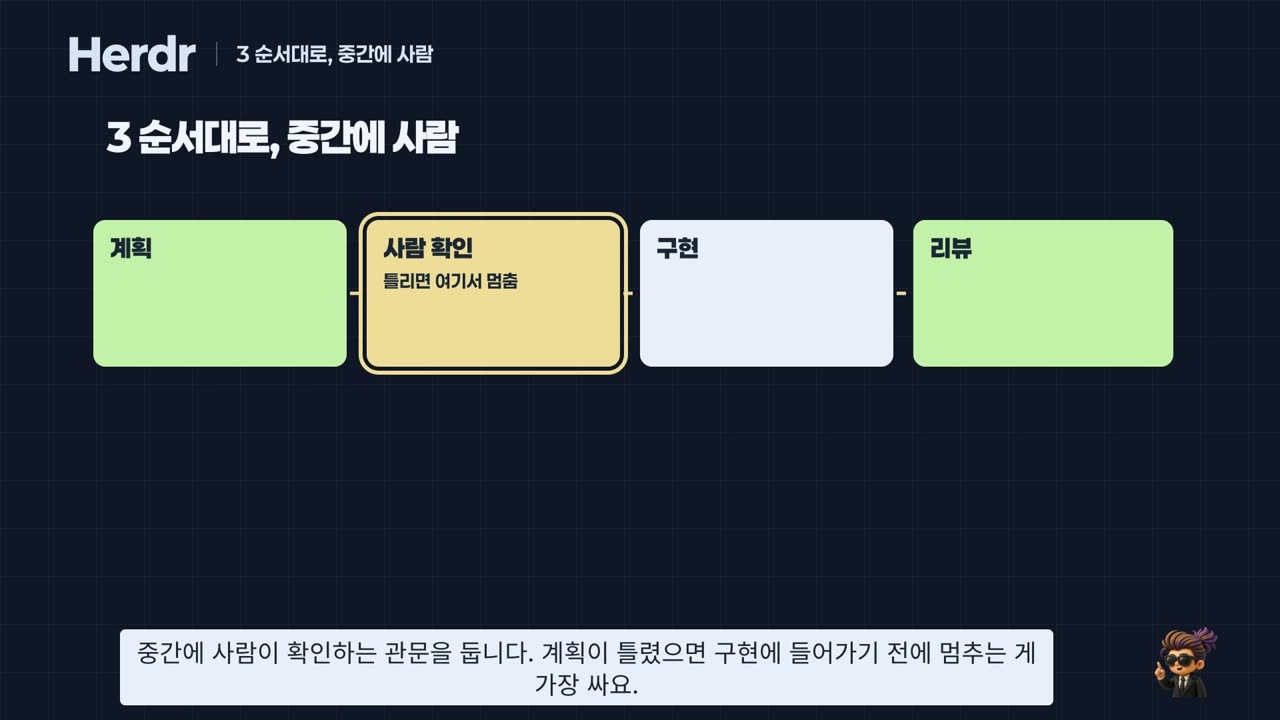
- Hand off in order (pipeline): plan → human approval → implement → review. Stopping before implementation when the plan is wrong is the cheapest fix. We wrote this order as a single shell script and ran the feature "highlight the search term in issue titles" from one line. The person approved the plan, granted two permissions, and checked the final screen [Measured].
- Coordinator: an agent that receives a big request splits it up, hands pieces to other agents, and doesn't edit code itself. In our run, Claude Code gave "rewrite the README" and "show per-label percentages" to two worktrees and two Codex agents. When both Codex agents stopped to ask permission to run tests, the coordinator did not approve on their behalf; it asked the person. After merging, 18
npm testtests and 5 contract tests all passed [Measured]. The plugin that turns this approach into a board is herdr-projects.
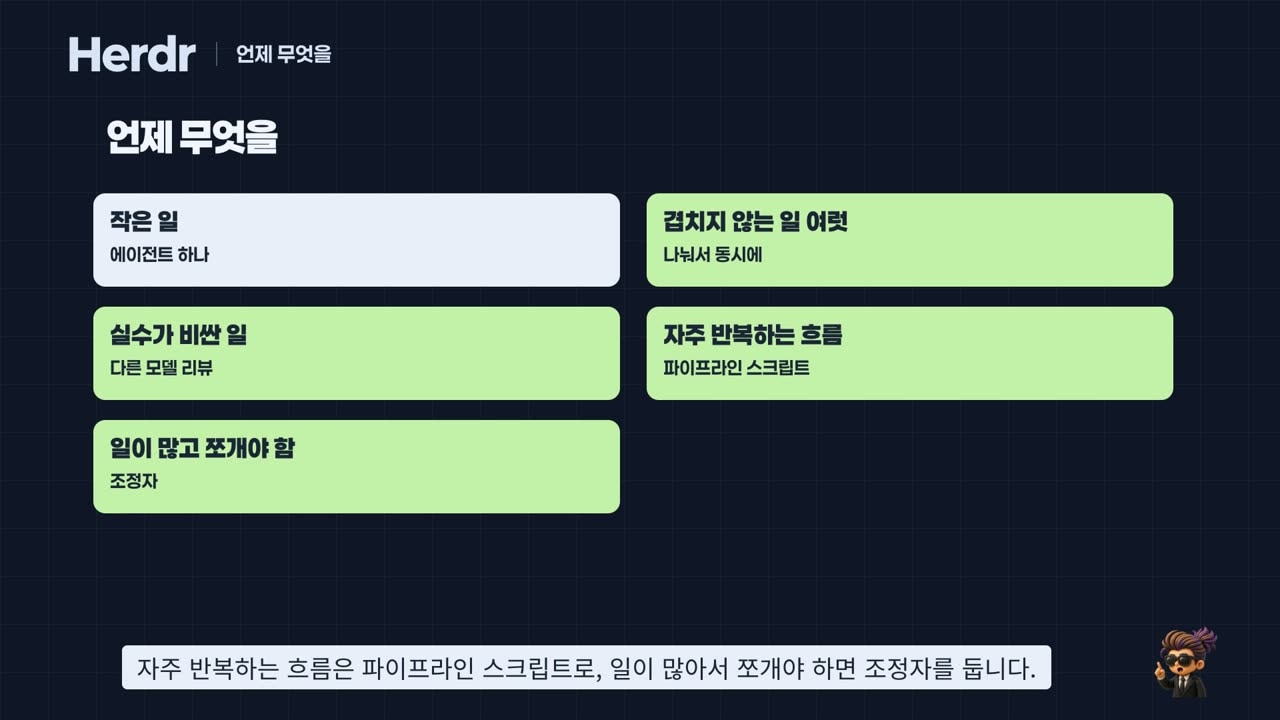
Choosing is simple. Small task: one agent. Several non-overlapping tasks: split and run in parallel. Costly mistakes: add a review from another model. A flow you repeat: a pipeline script. Too much work to do in one piece: a coordinator. Whatever the pattern, a person makes the final check. Where you place that checkpoint is the heart of the design.
8. Limits and cautions
- Status is an estimate read from the screen. A prompt Herdr has never seen can show as idle. Look at the pane before sending anything important.
- With a single agent you may not need it yet. It pays off once you run two or more at the same time.
- The coordinator board (herdr-projects) runs only on macOS and Linux, and it runs agents in a mode that doesn't ask permission. Each stays inside its own worktree, but use it only on repositories you trust. In our run the board stayed at "working", so we could not confirm the review and approval steps.
- Passing tests is not the finish line. As with the 404 link here, places tests don't look at need another model's eyes and a person's eyes.
- Everything was done on a Mac. For Windows, see the official Windows guide.
The more agents you run, the more it matters to see who is doing what and step in only when needed. Herdr gives you a place to do that.
Watch the video
A one-hour Korean-language video covers the whole hands-on run on real screens, from installation to continuing from a phone or another Mac. It goes public on October 29 at 7 p.m. KST.
Sources
- herdr.dev — home page figures (checked 2026-10-24), Agents, Session state, Plugins, Windows
- herdrdev/herdr — the Herdr repository (source of the public issues in the dashboard)
- persiyanov/herdr-reviewr · eliasstravik/herdr-projects · smarzban/herdr-file-viewer
- git-worktree documentation